With CS Browser you can download large files from Amazon S3 at the maximum speed possible, using your full bandwidth!
This was made possible by a new feature called Multipart Downloads. Now CS Browser breaks large files into smaller parts and downloads them in parallel, achieving significantly higher downloading speed.
This new feature also allows you to save on transfer costs when working on a weak Internet connections. If the download of a part fails, you may simply restart it. No need to download the entire file again.
To enable Multipart Downloads and configure part size:
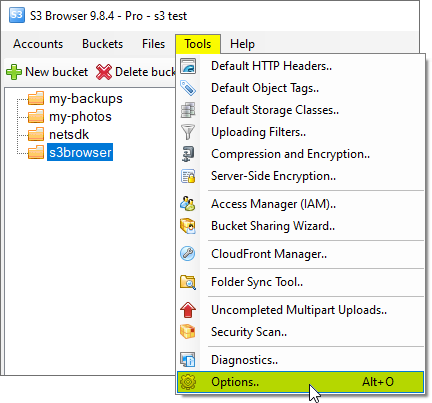
1. Click Tools, Options
Click Tools, Options
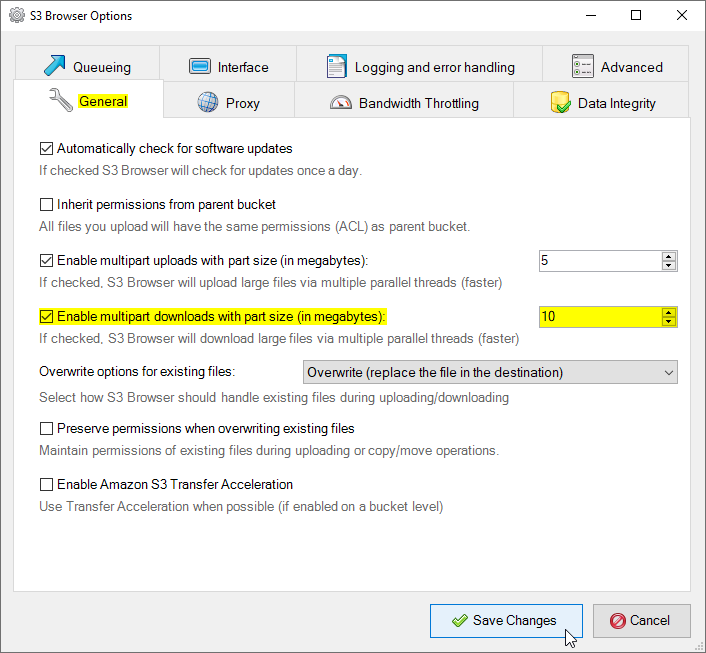
2. The Options dialog will open:
CS Browser multipart download settings
2. Turn on Enable multipart downloads with part size (in megabytes): and specify part size.
CS Browser is developed by Netsdk Software FZE and is not affiliated with, endorsed by, or sponsored by Amazon or AWS. Amazon S3 and Amazon S3 Glacier are trademarks of Amazon.com, Inc. or its affiliates.