S3 Object Ownership is a feature in Amazon S3 that enables you to manage the ownership of objects uploaded to your bucket and and to disable or enable access control lists (ACLs).
By default, Object Ownership is set to "Bucket owner enforced", and ACLs are disabled.
With ACLs disabled, the bucket owner becomes the exclusive owner of all objects in the bucket, managing data access through access management policies.
How to configure Object Ownership
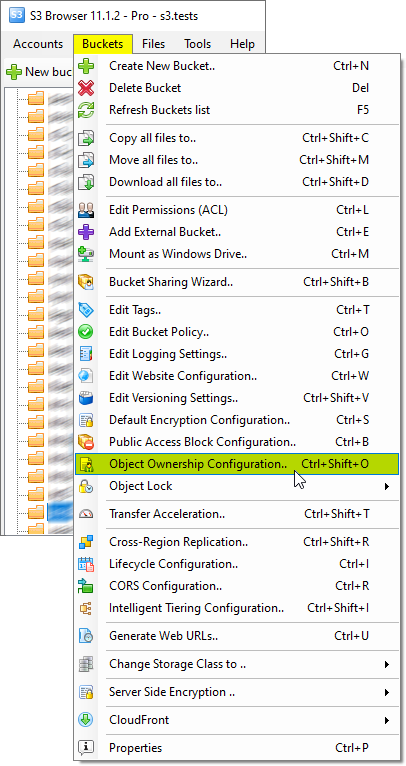
1. Select the bucket you want to configure Object Ownership for and click:
Buckets, Object Ownership Configuration..:
Click Buckets, Object Ownership Configuration or use the Ctrl+Shift+B keyboard shortcut
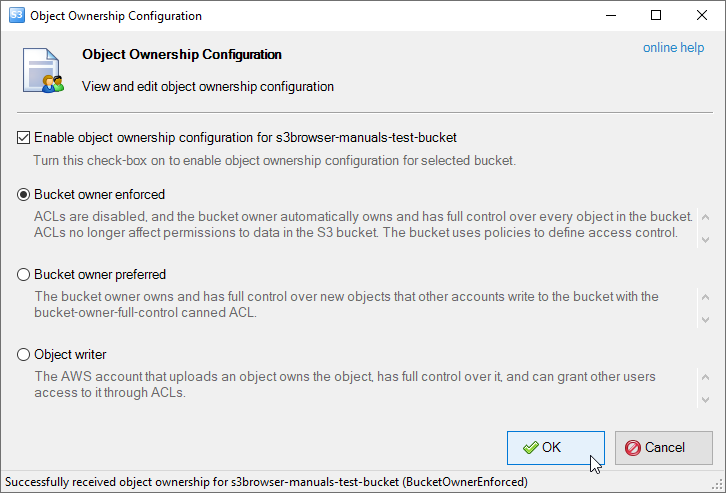
The Object Ownership Configuration dialog will open:
Object Ownership Configuration dialog
Bucket owner enforced - ACLs are disabled, and the bucket owner automatically owns and has full control over every object in the bucket. ACLs no longer affect permissions to data in the S3 bucket. The bucket uses policies to define access control.
Bucket owner preferred - The bucket owner owns and has full control over new objects that other accounts write to the bucket with the bucket-owner-full-control canned ACL.
Object writer - The AWS account that uploads an object owns the object, has full control over it, and can grant other users access to it through ACLs.
2. Select the desired ownership configuration and click OK.
CS Browser is developed by Netsdk Software FZE and is not affiliated with, endorsed by, or sponsored by Amazon or AWS. Amazon S3 and Amazon S3 Glacier are trademarks of Amazon.com, Inc. or its affiliates.