Upload and Download Your Files at the Maximum Speed Possible
TCP/IP protocol limitations make it challenging for a single application to fully saturate a network connection.
However, CS Browser Pro enables you to upload and download files using your network connection at full speed!
How it Works for a Large Number of Small Files:
Pro Version
The Pro version allows you to upload and download multiple files at the same time.
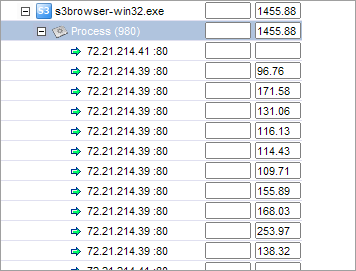
Multiple files are uploaded/downloaded simultaneously. Each TCP connection operates at full speed. In total, you get the speed you're paying for!
Screenshot from NetLimiter showing how CS Browser Pro utilizes the network connection.
Free Version
The Free version is limited to two simultaneous uploads.
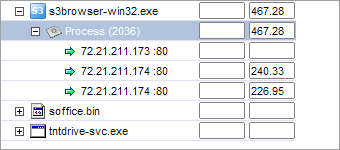
Only two files are uploaded or downloaded simultaneously. The Free version supports up to two concurrent uploads or downloads. For example, if your upload speed is 2 Mb, each connection might be limited by the protocol to approximately 256 Kb. In this case, you are only utilizing 512 Kb out of your 2 Mb available speed.
Screenshot from NetLimiter showing how CS Browser Freeware utilizes the network connection.
How it Works for Large Files:
Recently, Amazon S3 introduced a new multipart upload feature.
Large files can be split into smaller parts and uploaded in parallel. If the upload of a part fails, you can simply restart it. You can improve your overall upload speed by taking advantage of parallelism.
The multipart upload feature is enabled by default in both CS Browser Free and Pro versions. All files larger than 5 MB are uploaded via multiple parts in parallel.
The multipart download feature is also supported by both CS Browser Free and Pro versions! However, as you already know, the Free version is limited to two simultaneous transfers.
Pro Version
Multipart Transfers: Small parts of a large file are uploaded or downloaded simultaneously.
Multiple parts are uploaded or downloaded simultaneously.
You are getting full broadband speed.
Screenshot from NetLimiter showing how CS Browser Pro utilizes the network connection.
Free Version
Multipart Transfers: The Free version is limited to two simultaneous uploads or downloads.
Only two parts are uploaded or downloaded simultaneously.
The Free version allows up to two concurrent transfers.
Screenshot from NetLimiter showing how CS Browser Freeware utilizes the network connection.
To Adjust the Number of Concurrent Uploads and Downloads:
Navigate to Tools -> Options -> Queueing.
Click Tools, Options
Configure the number of concurrent uploads and downloads, then click OK.
CS Browser is developed by Netsdk Software FZE and is not affiliated with, endorsed by, or sponsored by Amazon or AWS. Amazon S3 and Amazon S3 Glacier are trademarks of Amazon.com, Inc. or its affiliates.