How to rename a file or a folder on Amazon S3. Working with Files and Folders.
CS Browser
Free Windows client for Amazon S3 and Amazon S3 compatible storage services
 
Follow

How to rename a file or a folder on Amazon S3

With CS Browser Freeware you can easily rename files and folders on Amazon S3.

To rename a file or a folder:

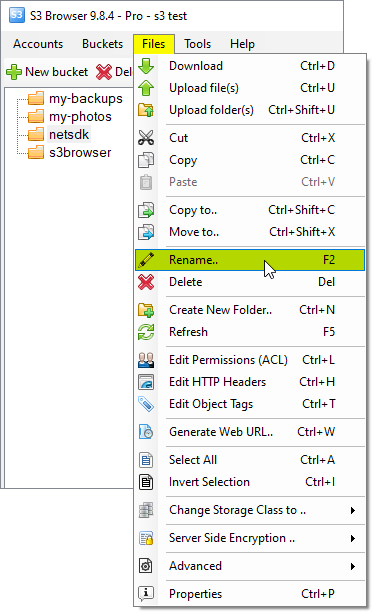
1. Start CS Browser select the file or folder and click Files, Rename:

Right-click the file or a folder

Select the file or folder and click Files, Rename. You may also use the F2 keyboard shortcut

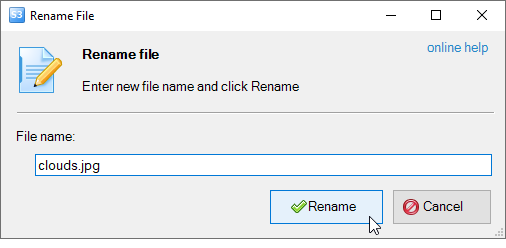
The Rename File dialog will open:

Type a new name and click Rename

Type a new name and click Rename

2. Type a new name and click Rename

CS Browser 13.3.5 Freeware
Powered by Amazon Web Services and Rated by CNET Editors!
Social Connection
 
People like CS Browser!
People like us
Our customers say

"CS Browser is an invaluable tool to me as a web developer to easily manage my automated site backups" -Bob Kraft, Web Developer

"Just want to show my appreciation for a wonderful product. I use CS Browser a lot, it is a great tool." -Gideon Kuijten, Pro User

"Thank You Thank You Thank You for this tool. A must have for anyone using Amazon S3!" -Brian Cummiskey, USA

Related Products
RdpGuard
protects your Windows Server from RDP Brute-force Attacks.
CS Browser is developed by Netsdk Software FZE and is not affiliated with, endorsed by, or sponsored by Amazon or AWS. Amazon S3 and Amazon S3 Glacier are trademarks of Amazon.com, Inc. or its affiliates.
Copyright © 2008-2026 Netsdk Software FZE. All rights reserved.  Terms of Use.  Privacy Policy.  S3 Drive.  RDP brute-force protection.